OS releases roadmap
Global lifecycle
The OS releases are attached to the following criteria:
- redpesk devel : follows CentOS Stream 9 with binary compatibility
- redpesk LTS: 10 years support with 5 years with functional updates and 5 years with maintenance updates (based on RHEL maintenance schedule)
- One minor release per year planned with intermediary release every 6 months
- Releases naming : redpesk OS versions are named from Brittany Islands names, sorted alphabetically.
- The first release is Arz
- The second release is Batz
- The third release is not named yet (name to be decided before 2027 - Candidates: Corn (Bihan))
- The fourth release is also unnamed (name to be decided before 2032 - Candidates: open for proposals!)
This is the release planning on the long run:
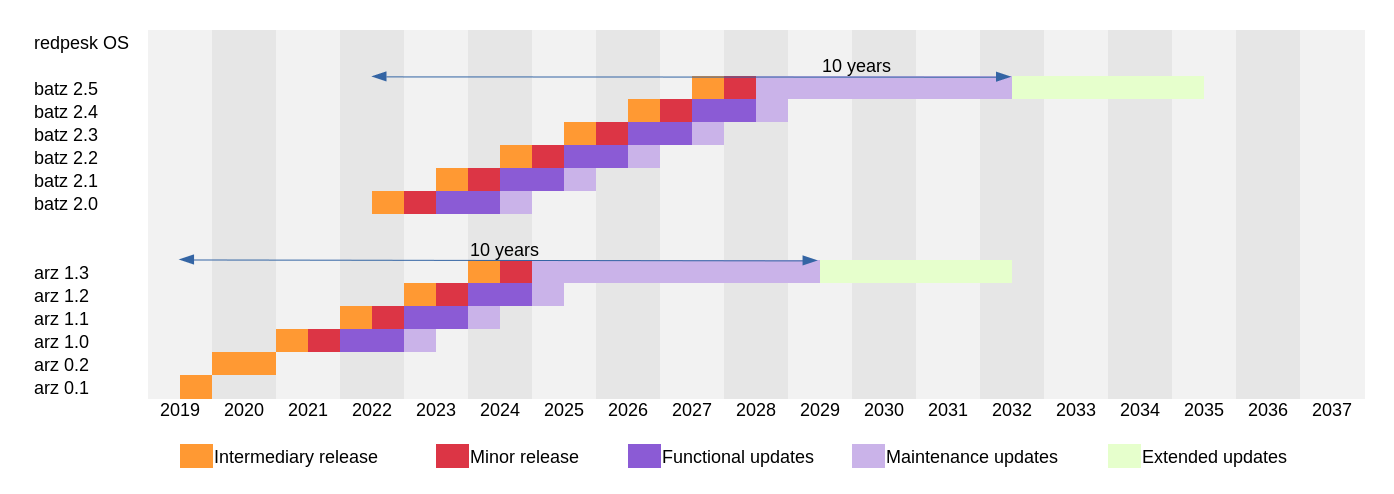
Zoom on redpesk OS releases and repositories
For each even release of RHEL, a new redpesk OS branch is created (Arz 1.0 for RHEL 8.4, Arz 1.1 for RHEL 8.6, Batz 2.0 for RHEL 9.2, Batz 2.1 for RHEL 9.4, …).
The following diagram explores the branches for redpesk OS Batz 2.x:
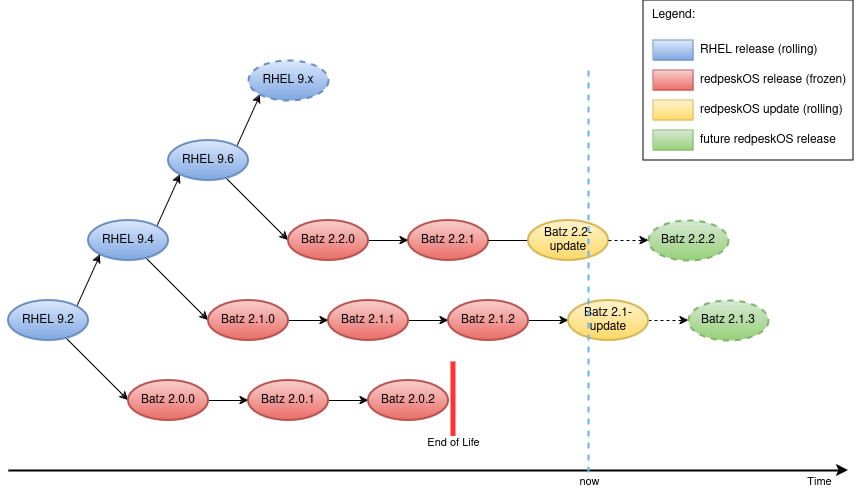
There are multiple elements here:
- frozen releases (e.g. 2.0.0, 2.0.1, …)
- “rolling” updates (e.g. 2.0-update, 2.1-update), updated regularly between two releases
- at some point in time, a branch reaches end-of-life: in this case, there’s no more
-updaterepositories.
For a given major release of redpesk OS, the repositories organization reflects the release cycle.
Let’s take a realistic situation in 2023 where:
- Arz 1.0 branch has 3 releases and has reached end-of-life
- Arz 1.1 branch has 2 releases and is still alive (this is the latest branch for Arz, aligned on RHEL 8)
- Batz 2.0 branch has 2 releases and is the first branch for Batz (aligned on RHEL 9)
Then the repositories look like this:
redpesk-lts
├── arz-1.0.0
├── arz-1.0.1
├── arz-1.0.2
├── arz-1.1.0
├── arz-1.1.1
├── arz-1.1-update
├── batz-2.0.0
├── batz-2.0.1
├── batz-2.0-update
├── arz-1.0 -> arz-1.0.2
├── arz-1.1 -> arz-1.1.1
├── arz-1 -> arz-1.1.1
├── arz -> arz-1.1.1
├── batz-2.0 -> batz-2.0.1
├── batz-2 -> batz-2.0.1
└── batz -> batz-2.0.1
Symbolic links allow to choose the stability level required for a given environment (development, integration, production …). For a given release name NAME and version V.M.S (major,minor,subminor):
-
NAME-V.M.Spoints to the specified release (V.M.S): this is guaranteed to never change. -
NAME-V.Mpoints to the latest release in the branchV.M(ex:arz-1.0 -> arz-1.0.2): it changes as soon as a new release is done in the branchV.m. -
NAME-VandNAMEpoint to the latest release of the latest branch (ex:arz-1 -> arz-1.1.1). It changes as soon as a new release is done in the latest branch. -
NAME-V.M-updateis the rolling distribution containing updates “on top” of the latest release in a given branchNAME-V.M(ex:arz-1.1-update,batz-2.0-update). It can change at any time. This repository only exists for branches which didn’t reach end-of-life. It can be seen as a preview for the upcoming release in the branch (ex:arz-1.1-updatecontains updates to be released inarz-1.1.2, which doesn’t exist yet).