-
Overview
-
redpesk OS releases
-
Security updates
-
Redpesk OS Tips and Tricks
-
Application Framework Manager
-
Application Framework Binder
-
APIs & Services
-
Security manager
-
OP-TEE within redpesk
-
Trusted Boot
-
Recovery features
-
redpak
-
Minimal image
- Reduce image size
- Optimizing boot time
-
Kernel fragments description
- Introduction to Linux Kernel Configuration
- 01 Disable IPC, Timers and Audit
- 02 Disable Kconfig, Scheduler and Initrd
- 03 Disable Perf, Profiling and Errata
- 04 Disable EFI, Power Management Debug and Energy Model
- 05 Disable Schedutil, CPUFreq Governors and Virtualization
- 06 Disable Kprobes and Jump Labels
- 07 Disable GCC Plugins and Function Alignment
- 08 Disable Partition Parsers
- 09 Enable Inline Spinlocks and Kernel Operations
- 10 Disable Swap, Memory Hotplug and KSM
- 11 Disable Networking IPv4, IPv6, Netfilter
- 12 Disable SCTP, VLAN, TIPC, BATMAN
- 13 Disable Wireless, Bluetooth, CAN and RFKILL
- 14 Disable PCI and Firmware
- 15 Disable GNSS and ProcEvents
- 16 Disable Block Storage NBD and AoE
- 17 Disable EEPROM and Misc Drivers
- 18 Disable Network Device Drivers
- 19 Disable PHY Drivers
- 20 Disable PPP, WLAN Coexistence, and Failover
- 21 Disable Input Devices
- 22 Disable Serial, TTY and TPM
- 23 Disable I2C, Power and Sensor Drivers
- 24 Disable MFD, Display and Media Drivers
- 25 Disable USB, Sound, RTC and VirtIO
- 26 Disable Filesystem Encodings and Compatibility
- 27 Enable Minimal Cryptographic Core with SHA3 and XTS
- 28 Disable Hardware Cryptography, Keep DRBG and Jitter Entropy
- 29 Disable Kernel Debugging Features
- 30 Disable Filesystem Verity and SecurityFS
-
Zephyr in Redpesk
-
PERM-CHECK extension
-
Mender redpesk (OTA)
-
Hardware support
- Download images
- Image metrics
- Trusted Boot
- Boards - ARM64
- Boards - x86_64
- Boards - Virtual
- Miscs
Overview of the security framework
First of all, redpesk OS is a linux OS embedding the default
security mechanisms of Linux.
This brings a solid basis for
creating secured system.
The mechanisms are:
- Discretionary Access Control (DAC)
- Mandatory Access Control (MAC)
- Capabilities
- Namespaces
The security framework of redpesk OS adds the ability to manage permissions for services and attribution of small grained permissions.
The table below lists main security behaviors and the corresponding protection measures.
| Behaviour | Protection |
|---|---|
| process can’t be killed | use DAC and MAC isolation |
| files are protected | use DAC and MAC isolation |
| service can check client permissions | use MAC and redpesk framework |
| client on network are checked | redpesk framework and OAuth |
These are also summarized by the figure below, where cynagora is a component of the framework.
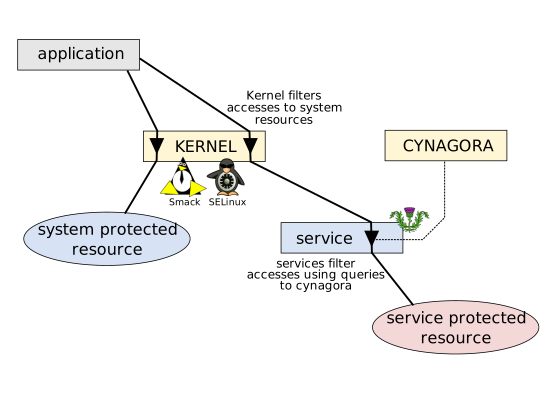
Applications and services are delivered by packages. For redpesk OS these are RPMs. When a package is installed, the content of the RPM is scanned by the security framework to get metadata about the package. These metadata are used to setup the security environment of the installed package.
Objects provided by Linux kernel are primarily protected by the setting of DAC. This protection, if required can be enforced using MAC. In both cases, redpesk is flexible enough to let architects tune the default protection.
Objects managed by services and applications (services and applications are almost the same thing, and for redpesk security framework, exactly the same thing) can be protected using the permission based security framework. To achieve that goal, applications just need names of permissions to be checked. These names are either chosen in the set of already existing permissions or created as needed in the namespace of the application.
The permissions are checked based on attributes of the requester (possibly with delegation). The attributes that can be checked are:
- the user identity,
- the application identity,
- the session token.
The test of one permission is made using the permission database service named cynagora. To test the permission of a client, an application requests cynagora to evaluate if it satisfies the required permission. This can be done using the methods below:
- use the micro-service framework facilities that incorporates test of permissions required either statically in a declarative way or dynamically through a convenient API;
- use a convenient C library (ask for binding in other languages),
- use the protocol of cynagora through a connection to its client interface.
The cynagora service has the ability to establish a bridge between permissions and roles. This can be leveraged for defining a role based access control.